Summary: This article explains how the classic UX principle of recognition over recall applies to modern AI interfaces. It argues that blank chat-based AI inputs often create unnecessary cognitive effort because users must define their intent, understand system capabilities, write clear prompts, and manage constraints without support. The article explores why this is especially difficult for untrained or semi-skilled users and why relying on prompt-writing ability is not a mature UX solution. It highlights design patterns such as examples, suggestions, guided structures, interpreted prompt previews, and reusable prompt components. The core message is that AI interfaces should help users recognize options and shape intent, rather than forcing them to recall everything and write perfect prompts from scratch.
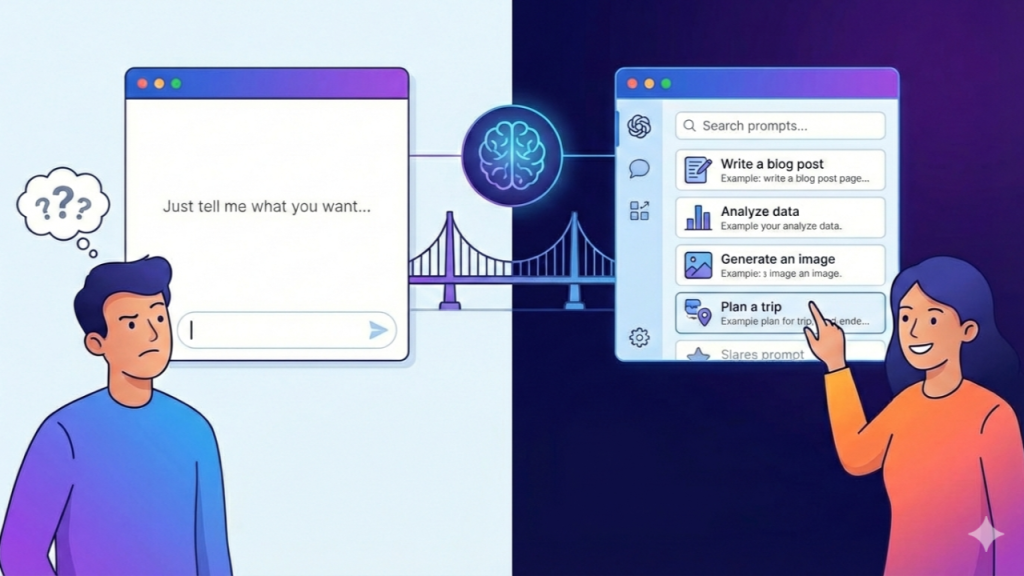
One of the most basic principles in UX is also one of the most reliable ones: recognition is easier than recall. We design menus so users don’t have to memorize commands. We follow best practices to reduce the effort needed to understand a system. We show options based on familiar mental models. We use placeholder text, hints, and examples to make interactions clearer and safer.
This has been true for decades. With AI, however, this principle feels temporarily sidelined. Not because we stopped believing in it, but because we haven’t fully figured out yet how to apply it well in this new context. The most common market solution today is still a blank input field that says: “Just tell the AI what you want.” From a UX point of view, that’s a big red flag.
Why AI Interaction Feels Natural — and Why That’s Misleading
After a while, interacting with AI through a chat interface starts to feel intuitive. Almost natural. Typing into an input field is something most people are comfortable with, so at first glance, the experience seems simple. That simplicity is misleading.
People who haven’t spent time learning how AI works use these interfaces very differently from those who have. AI education will improve over time, but in any tool used at scale, the primary persona will always be the unskilled or semi-skilled user. And that’s where the real problem begins. Most users interpret AI interaction as a conversation. They expect something similar to everyday dialogue: action and reaction, question and answer. But current AI systems aren’t really asking users to talk.
They’re asking them to write prompts, which quietly requires users to:
- Clarify what they actually want
- Turn that intent into precise language
- Guess how the system will interpret it
- Add constraints, context, and edge cases
- Do all of this without any real structure
That’s not natural interaction. That’s cognitive effort. This is very different from how we usually design interfaces. In traditional UX, we rely on predefined flows, clear choices, and progressive disclosure. We design with usability, accessibility, and error prevention in mind. We would never design a bank transfer screen that says: “Please describe in detail how you want to move your money.” We give users fields, steps, and constraints. Yet in AI products, we’ve somehow accepted the blank canvas as the default.
Why Recall Is Failing Us in AI
Recall-heavy interfaces only work when a few conditions are met:
- Users already know exactly what they want
- They know the right terminology
- They understand what the system can and can’t do
- They can express their intent clearly
In AI UX, these conditions are rarely true.
Most users:
- Don’t fully know what they want until they see an example
- Don’t really understand the system’s capabilities
- Don’t know which details matter
- Don’t have a clear sense of what a “good” prompt looks like
So they hesitate. They try something vague. They experiment randomly. Or they simply give up.
This is the articulation barrier in practice. Not because AI is bad, but because our interfaces still rely too much on users doing the hard work. We’re not there yet in terms of usability—and that’s okay. But it’s something we need to acknowledge.
The Blank Box Problem
From a product perspective, a single input field is appealing. It’s fast to build, visually clean, and flexible enough to support almost any use case.
From a UX perspective, it creates serious problems.
The biggest one is that it shifts responsibility onto the user:
- Responsibility to understand the problem
- Responsibility to define what “success” means
- Responsibility to structure the input
- Responsibility to iterate in the right direction
In practice, this means we’ve replaced good interface design with good prompting skills. As AI adoption grows, this will change. One of the first things that will need rethinking is how we define errors and failure states—but that’s a topic for another article.
Recognition as the Real Breakthrough in AI UX
If we take “recognition beats recall” seriously in AI products, the design challenge changes immediately.
Instead of asking:
How can we teach users to write better prompts?
We should be asking:
How can we design interfaces where users don’t need to write great prompts at all?
That shift leads to very different design decisions.
1. Examples and Suggestions
This is likely the most important short-term bridge between today’s AI interfaces and more mature UX. An example-first approach, supported by suggestions, makes it much easier for users to get started and move in the right direction. While suggestions do guide users within certain boundaries, they also:
- Passively teach what’s possible
- Stay within the user’s own context, reducing visible limitations
- Lower cognitive effort
- Help recover even poorly written prompts through refinement
This is recognition doing what it does best: reducing friction without taking control away.
2. Replacing Free Text with Guided Structure
We’re already seeing this pattern emerge, and for good reason. Guided structures slightly limit flexibility, but they significantly improve outcome quality—especially for users who don’t have the experience to critically evaluate AI outputs and tend to trust them by default.
An example for a simple structure :
- Goal: write / analyze / summarize / create
- Audience: junior designer / executive / customer
- Tone: formal / friendly / direct / playful
- Length: short / medium / long
Instead of recalling all of this in a block of text, users recognize and select. The AI can still be creative, but the intent is much clearer from the start.
3. Making Intent Visible Before Generation
One of the most underused patterns in AI UX today is the interpreted prompt preview. Human–computer interaction has always relied on clarification. Before moving forward, both sides need to agree on what something means. Interpreted prompts help the system confirm it understood the user correctly.
But the equally important step is the feedback loop in the other direction: checking whether the outcome is actually understandable for the user.
Right now, many AI flows continue even when the result isn’t fully clear. This creates cascading problems:
- Confusion grows with each step
- Drop-off increases
- Backtracking becomes painful once users are several steps in
Making intent visible early turns trial-and-error into something much closer to real control.
4. Treating Prompts as UI Components
At some point, we need to stop thinking about prompts as plain text and start treating them like interface elements.
That means:
- Reusable prompt templates
- Editable building blocks
- Modular constraints
- Style presets
- Domain-specific libraries
In practice, this becomes a kind of design system for AI UX—built on the same principles we already trust in traditional products.
Why This Matters for Real Products
This isn’t theoretical. In high-stakes domains like banking, healthcare, or enterprise software, recall-based prompting is risky. If users don’t articulate their intent clearly, AI can:
- Misunderstand the request
- Produce misleading results
- Miss critical constraints
- Sound confident while being wrong
Recognition-based design reduces these risks by making intent explicit and structured. In regulated, complex environments, AI can’t afford to guess. It needs clarity, boundaries, and human oversight. Recognition helps create exactly that.
Respecting Classic UX Heuristics in the AI Era
This isn’t about replacing established heuristics. It’s about applying them properly. A useful way to frame AI UX decisions is this: Make intent recognizable, not recallable.
When evaluating an AI feature, the question should be simple:
- Does this design help users recognize their options?
- Or does it force them to figure everything out on their own?
If it’s the latter, the UX simply isn’t mature yet.
Where This Is Heading
As AI UX evolves, chat won’t disappear—but it won’t be enough on its own either. We’ll see more interfaces where users don’t just ask for results, but actively shape them. Intent will become visible. Constraints will be adjustable. Feedback will come earlier, not at the end. The more complex and high-risk the domain, the less viable a pure blank-chat interface becomes. In that future, the most valuable skill won’t be prompt engineering. It will be interaction design—applied with the same core principles we’ve relied on for years.
AI gives us extraordinary capabilities, but capability without usability isn’t innovation. It’s friction, wrapped in something that looks impressive. If we want AI to truly empower users, we have to stop assuming they can perfectly articulate intent in prose. We need to design for recognition, not recall, because the best interface isn’t the one that accepts any prompt. It’s the one that helps users form the right one.
More articles on Medium
More articles on Linkedin